Tuesday, October 26, 2010

DeBacker Reflects on Assessments


Classroom Assessment Techniques by S. Longstreet (Youtube)

Assessments

            Assessments come in all forms from thumbs up or down to those high stake standardized test. Popular terms for assessments types are formative and summative. Merriam Webster Online Dictionary defines formative as “capable of alteration and development” (2010).
Encarta dictionary defines formative assessments of students as “the assessment at regular intervals of a student's progress with accompanying feedback in order to help to improve the student's performance” (2010). Formative assessments are ongoing and can direct the teachers’ instruction according to the needs of the students at any given time during a lesson.  Merriam Webster dictionary online defines summative in terms of cumulative, “made up of accumulative parts” (2010).  The National Middle School Association comments on summative assessments:
Summative Assessments are given periodically to determine at a particular point in time what students know and do not know. Many associate summative assessments only with standardized tests such as state assessments, but they are also used at and are an important part of district and classroom programs. Summative assessment at the district/classroom level is an accountability measure that is generally used as part of the grading process (2010).
Opinions on the value of formative and summative assessments vary greatly among teachers, schools, and districts. DeBacker’s classroom experiences lead her to value formative assessments over summative assessments. Since formative assessments are ongoing she can assess target goals on a regular basis and direct her teaching on a class by class basis, thus providing the students with authentic and relative teaching and learning experiences. As a result of incorporation regular formative assessments, DeBacker’s students tend to have a great deal of success on those high stake summative assessments.  


DeBackers Assessment Experience
Created using says-it.com
 
References

            Cumulative. (2010). Merriam-Webster online dictionary. Retrieved October 26,


            Formative. (2010). Merriam-Webster online dictionary. Retrieved October 26,

                        2010, from http://www.merriam-webster.com/dictionary/formative

            Formative assessment. (2010). MSN Encarta dictionary online.  Retrieved

October 26, 2010, from


            Longstreet, S. (2008, February 28). Classroom Assessment Techniques. Retrieved

                        October 26, 2010, from http://www.youtube.com/watch?v=g4ogt0yI8xA

The National Middle School Association. (2010). Formative and Summative Assessments

in the Classroom. Retrieved October 26, 2010, from


px       

Sunday, October 10, 2010

Technology-infused Classroom


Video: Classroom of the Future


Technology-infused Classroom
            Churches’ (2008) research indicates that a technology-infused classroom can facilitate 21st century learning by encompassing the factors of resources, skills, and curriculum (p. 8).  In addition the physical classroom space must change to accommodate a learning environment that allows for both teacher centered and student centered modes of instruction (p. 14). The researcher identifies changes of the traditional means of instruction and learning:
Welcome to the 21st Century. The rapid advances in technology, linked with reducing cost and increased connectivity are changing our students. They are, for better or for worse, learning in different modes. For teaching to be relevant, for it to be meaningful, teachers must change and adapt. Our curriculum, our teaching practice, our learning spaces and our approaches to technology all must change in the current age (p. 15).  
Mountain Gap Middle School (MGMS) in Huntsville, Alabama is emerging into a technology-infused school. MGMS is now equipped with projectors and document cameras in the majority of classrooms. Most academic teachers now have a Promethean whiteboards and accompanying software. Professional development is available in varying areas of technology at the school level and district level. Mrs. DeBacker, Mrs. Moore and Mrs. Lane are emerging leaders in technology integration at both the school and district level; they provide in-service opportunities for teachers throughout the district.  Teachers across the district are at least dabbling with technology integration. With limited funding and   knowledgeable technology support personnel many teachers are at a standstill and are stuck on the lower end of the continuum of transition from the traditional to the 21st classroom of embedded technology instruction.  Lowther, Russell, and Smaldino (2008) describe the transition from the traditional classroom to the digital classroom as being most important for the education of today’s digital native students. Furthermore, a continuum by Prensky, as cited by the researchers, for moving from traditional curriculum instruction to technology embedded curriculum instruction starts with dabbling and ends with technology-infused classroom (p. 334).   Figure 1 gives a visual of what the future classroom may look like.  

classroomw2
Figure 1. Future classroom (Churches, 2008)


References
Churches, A. (2008).  Welcome to the 21st century. Retrieved October 10, 2010, from
Leiboff, M. (2007, September 12).  Classroom of the future.  [Video file]. Retrieved October 10,

Lowther, D. L., Russell, J. D., Smaldino, S. E. (2008).  Instructional technology and

            media for learning (9th ed). New Jersey: Merrill Prentice Hall
        

Tuesday, September 28, 2010

Visual Literacy and Internet


Visual Literacy and Internet
            Visual literacy and the use of Internet can have a powerful impact on the teaching and learning process in the classroom.  Visual literacy is the learned capability to interpret visually conveyed information and create visual messages such as still images, drawings, diagrams, charts, graphs, videos, tables and presentation tools. Lowther, Russell, Smaldino, (2008) describe the possibilities of the powerful role in the use and creation of visuals as (a) concrete reference for ideas, (b) abstract ideas become concrete, (c) learners become motivated and engaged, (d) focused attention, (e) information presented in multiple formats, (f) allows for recall of learned concepts, and (g) simplify information for learning.  Lowther et al. 2008, provide a clear picture of the Internet:
The Internet is a worldwide system for linking smaller computer networks together. It is a network of networks with a frequently changing collection of millions of computer networks serving billions of people around the world. Any individual on the Internet can communicate with anyone else on the Internet (page 190).
The Internet allows for students to decode ever ending visual cues.  The ability to productively use the Internet and the ability to encode and decode visuals enable students to tap into their own creativity, productivity, and understanding of content. The teacher should demonstrate how to use the Internet and visual cues appropriately, in doing so the student will gain insight on how to discern accurate information form inaccurate information.  A teacher can find an abundance of lessons on the website Alabama Learning Exchange (ALEX) that often incorporate more than one type of technology. In a subtraction of integer’s lesson, the lesson designer included videos, research, online games for reinforcement, group work and online and paper assessments. Many of the lesson’s elements require the student to decode a multitude of visuals. Another example of the use of the Internet and visual literacy is a tool called EDvoice thread. The tool allows students to encode visuals for peers. Peers can comment and provide ideas for each other and even create visuals together via the Internet.  A sample lesson that reinforces geometry shapes, terms, and formulas is an Animoto scavenger hunt.  Animoto is a web based tool used to make music videos with pictures, video and text.  Students are provided pictures of everyday objects or computer generated images of geometry formulas, terms, and figures. The object is for the students to choose the correct figure and the corresponding term. More advanced students will include formulas that correspond to the image and term. They have to arrange the images so that the viewer sees the geometric figure, the term and formula back to back in the video. Students can even choose their own music. Using the Internet to enhance lessons provides continuous opportunities to improve visual literacy.
References
Ballett, A. (2009, February 22). Visual literacy across the curriculum. Retrieved September 27,
            2010, from http://www.youtube.com/watch?v=XQNbAtK3c3g   
Internet (2010). Merriam­-Webster visual dictionary online. Retrieved September 27, 2010, from
Lowther, D. L., Russell, J. D., Smaldino, S. E. (2008). Instructional technology and media for        
            learning (9th ed). New Jersey: Merrill Prentice            Hall                                                                                                                                                            

Tuesday, September 14, 2010

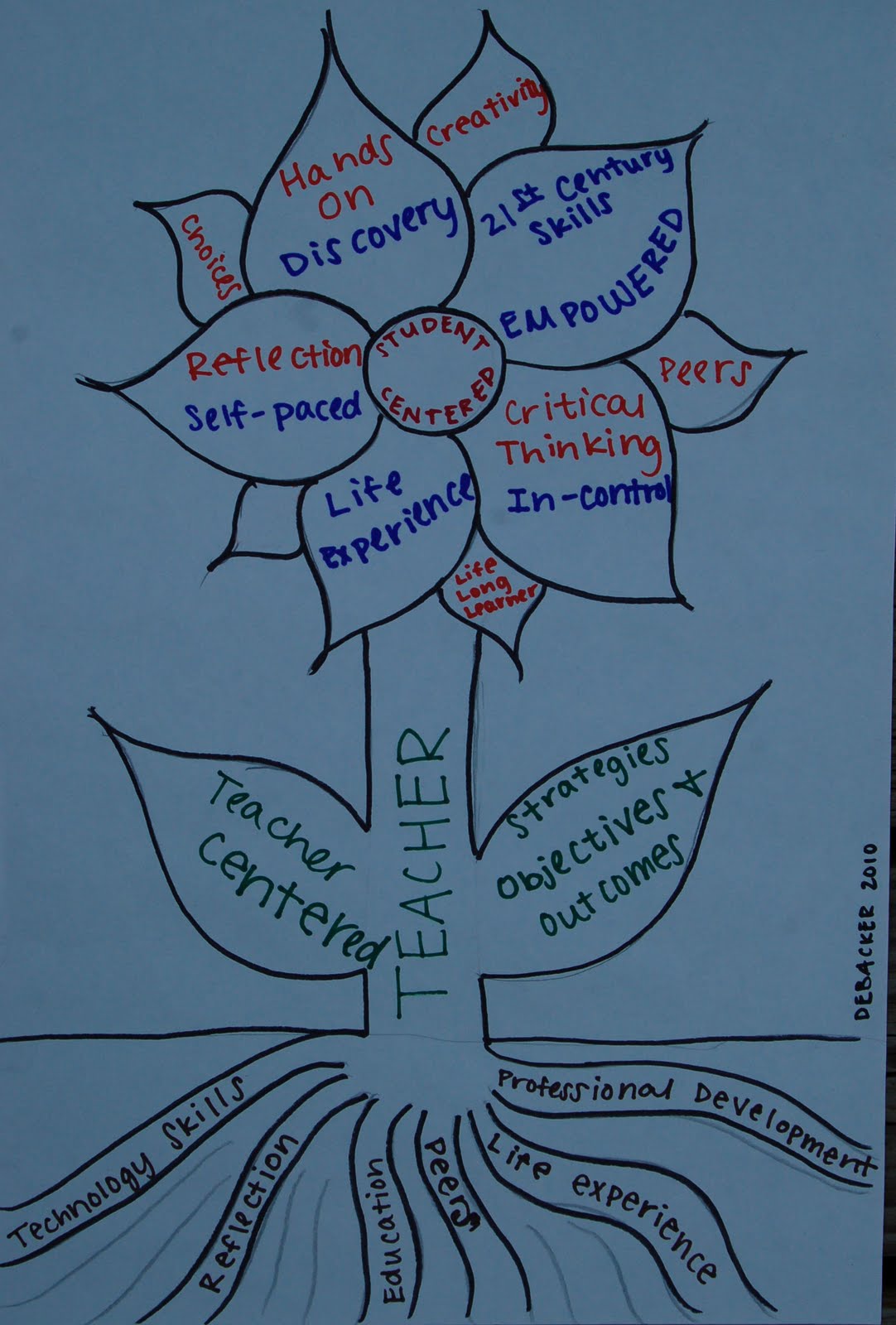
DeBacker Blogg 1: 21st Century Instructional Strategies


21st Century Teaching Strategies
            The 21st century classroom allows for the implementation of technology tools that enable the teacher to use a variety of instructional strategies; and can promote a student-centered and or teacher-centered classroom that meets the needs of all students. Strategies that use technology have proven to be engage and motive students to such a degree that they are empowered 21st century learners. True technology integration “involves students constructing their own learning while using both hardware and software tools and allows for student-centered approaches for both teacher and student. Blending content, pedagogy, and technology enables students to make real-world, everyday connections to what is being learned” (Woodbridge, 2004).  Problem-Based Learning (PBL) is an example of a student-centered strategy that has many opportunities for the use of technology. Boud and Feletti state that PBL, “through the use of problems/issues/triggers, encourages the students to develop their own learning goals, thereby filling in the gaps in their knowledge or understanding” (as cited in McMahon, O’Neill, 2005). The PBL strategy can be designed to reach and accommodate an array of learning styles as well as varying academic and technology abilities. The opportunities for technology depend on the objectives and desired outcomes of the PBL as well as the available technology tools for the teacher and student. Other examples of student-centered strategies that lend themselves to enhancing and developing 21st century skills are as follows: web-quest, simulation, gaming, cooperative learning, and discovery. Teacher-centered strategies include but are not limited to the following: drill and practice, lecture, discussion, demonstration, and tutorial. Teacher-centered strategies can lend themselves to the use of technology. An everyday lecture can be turned into an interactive lesson with the use of a Smartboard or a Promethean white board. Lectures can include images, audio, and video. Lowther, Russell, and Smaldino sum up the importance of teachers reflecting and planning for teaching 21st century learners as follows:
There are two categories of instructional strategies, teacher-centered and student-centered. While there is no one right way to teach, teachers have a variety of instructional strategies they can use to help facilitate student learning. Teachers need to make informed decisions about the learning needs of their students and select the instructional strategies that are best suited to helping students achieve the learning outcomes. (Lowther, Russell, Smaldino, page 45)


Education Blooms with Knowledge


References
Marzano, R. (2009, December 9). Solution tree. Robert Marsano on technology and instructional
               stategies. Retrieved September 12, 2010, from
                http://www.youtube.com/watch?v=XCrd8Sqf4ig                                         
McMahoun, T., O’Neill, G. (2005). Student-centered learning: What does it mean for students
lectures. Retrieved September 12, 2010, from
Lowther, D. L., Russell, J. D., Smaldino, S. E. (2008). Instructional technology and media for
            learning (9th ed). New Jersey: Merrill Prentice Hall
Woodridge, J. (n.d.). Technology integration as a transforming teaching strategy. Retrieved
September 12, 2010, from